Part 2 of the Encryption Series. Part 1: Encryption Demystified covers the fundamentals.
“Is the data encrypted at rest?”
It is the most common question in every security questionnaire, every compliance audit, every enterprise customer conversation. And the answer is almost always “yes.”
But here is the question that rarely gets asked:
Encrypted at which layer? And protected against which threat?
We have had multiple customers - running PostgreSQL, MongoDB, and storing files in S3 - ask us to “encrypt the data.” Every time, the conversation that follows reveals that “encryption” means very different things to different people. A DBA thinks filesystem. A security auditor thinks column-level. A compliance officer just needs a checkbox.
This article breaks down what database encryption actually means at each layer, what it protects against, what it does not, and how to make the right choices for your environment.
The Encryption Layers
There are broadly four layers where encryption can happen for data at rest:
| |
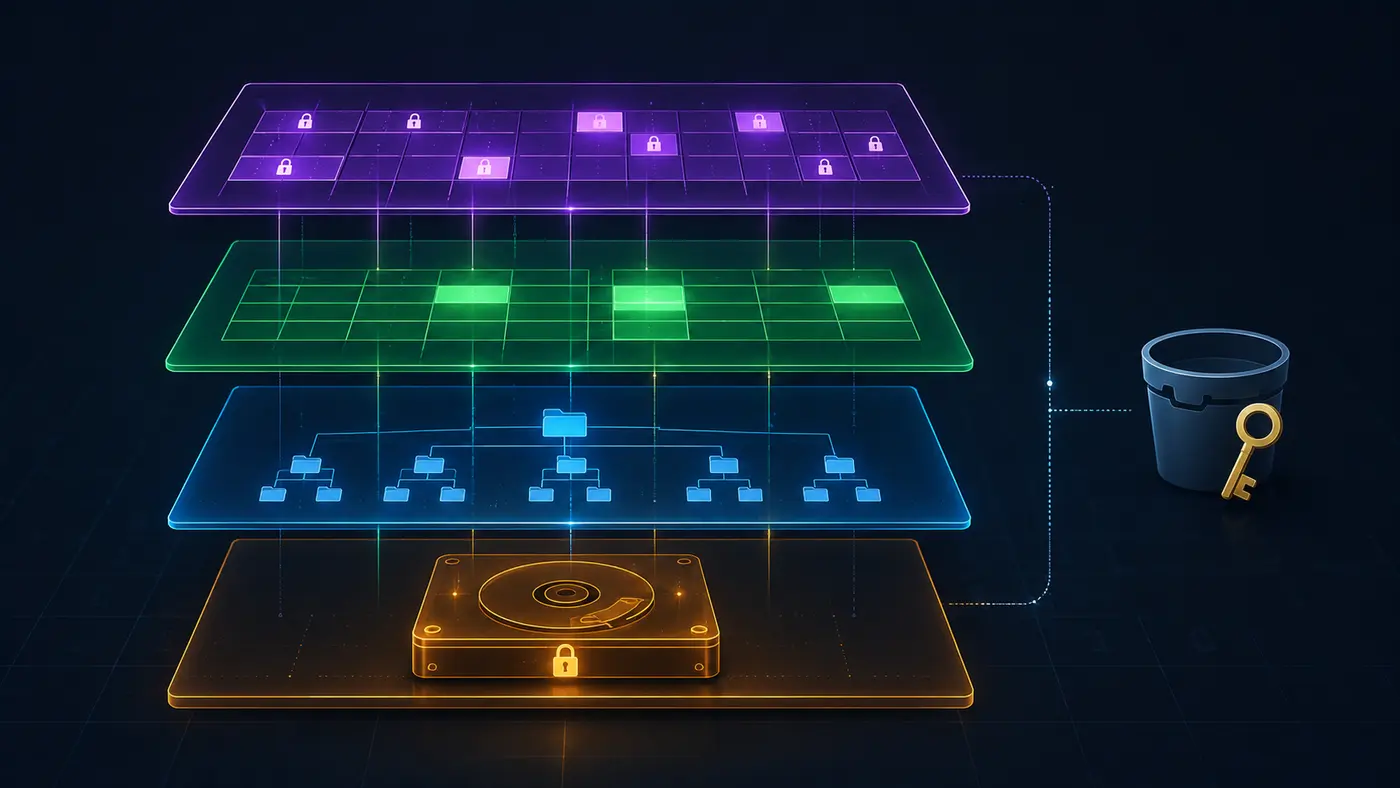
The cover image of this article visualizes exactly this: four stacked layers, each glowing in a distinct color - amber for hardware/disk encryption at the bottom, blue for filesystem/volume encryption, green for database TDE with highlighted table cells, and purple for column-level encryption at the top, with an S3 bucket and key on the side. Each layer adds protection, but none of them protect against everything.
Layer 1: Filesystem and Volume Encryption
This is the most common starting point. Encrypt the entire disk or volume that the database lives on.
Technologies:
- Linux LUKS/dm-crypt - standard for on-premise Linux servers
- AWS EBS encryption - transparent, uses KMS keys
- Azure Disk Encryption - BitLocker underneath
- GCP Persistent Disk encryption - on by default
What it protects:
- Physical theft of the drive or server
- Decommissioned hardware with data still on disk
- Unauthorized access to raw block devices
What it does NOT protect:
- An attacker with database credentials - the DB serves data in plaintext to authenticated users
- A compromised application - if the app can query the DB, it reads plaintext
- A rogue DBA - they see everything through the SQL interface
- Backup files - unless the backup destination is also encrypted
This is the layer most people mean when they say “encryption at rest” on a compliance form. It is necessary but not sufficient.
PostgreSQL on LUKS:
| |
Layer 2: Database Engine Encryption (TDE)
Transparent Data Encryption operates inside the database engine itself. The database encrypts its own data files, WAL (Write-Ahead Log), and temporary files.
PostgreSQL TDE
PostgreSQL introduced TDE support (via community patches and extensions, with native support maturing in recent versions):
- Encrypts table data files, indexes, WAL segments, and temp files
- Uses AES-128 or AES-256
- Key managed per tablespace or cluster-wide
- Transparent to applications - no query changes needed
| |
Key management:
- The master encryption key must be provided at database startup
- If the key is lost, the data is unrecoverable
- Key rotation requires re-encrypting the data files
MongoDB Encrypted Storage Engine
MongoDB Enterprise (and Percona Server for MongoDB) supports encryption at the storage engine level:
| |
- Encrypts all data files, journal files, and indexes
- AES-256-CBC or AES-256-GCM
- Supports KMIP for external key management (HashiCorp Vault, AWS KMS)
- WiredTiger storage engine handles the encryption transparently
What TDE adds over filesystem encryption:
- Protection against someone copying raw data files without the DB key
- The DB controls its own encryption - not dependent on the OS layer
- WAL/journal encryption (filesystem encryption covers this too, but TDE makes it explicit)
What TDE still does NOT protect:
- Authenticated database users - they see plaintext through queries
- Network traffic - data travels unencrypted unless TLS is enabled
- Memory - data is decrypted in RAM during query processing
- Backups -
pg_dumpormongodumpoutput is plaintext unless separately encrypted
Layer 3: Column-Level and Field-Level Encryption
This is where encryption actually protects against a compromised database or a rogue DBA.
The application encrypts specific sensitive fields before writing them to the database. The database stores ciphertext. Even a full database dump reveals nothing for those fields.
| |
The trade-offs are real:
| Benefit | Cost |
|---|---|
| Protects against DB-level compromise | Cannot query encrypted columns (no WHERE, no JOIN, no INDEX) |
| Protects against rogue DBAs | Application complexity increases |
| Per-field key rotation possible | Key management becomes critical |
| Meets strictest compliance requirements | Performance overhead for encrypt/decrypt |
When column-level encryption makes sense:
- PII fields (Aadhaar numbers, PAN, SSN)
- Payment card data (PCI-DSS requirement)
- Health records (HIPAA)
- Any field where “the DBA should not see this” is a requirement
When it is overkill:
- Non-sensitive operational data
- Data that needs to be searchable or joinable
- Internal systems where the DB admin is trusted
S3 and Object Storage Encryption
Object storage encryption has its own terminology and its own set of trade-offs.
AWS S3 Encryption Options
| Option | Key Managed By | Envelope Encryption | Use Case |
|---|---|---|---|
| SSE-S3 | AWS (fully managed) | Yes, transparent | Default, compliance checkbox |
| SSE-KMS | AWS KMS (your key policy) | Yes, auditable | Regulatory, key access logging |
| SSE-C | You (customer-provided) | You handle it | Full control, you manage keys |
| Client-side | You (encrypt before upload) | You handle it | Zero-trust, data never in plaintext on AWS |
SSE-S3 is the simplest - AWS manages everything. But AWS also holds the keys, which means AWS (or anyone with AWS access to your account) can theoretically decrypt the data.
SSE-KMS gives you a KMS key that you control the policy for. You can audit who accessed the key, restrict access, and require MFA for decryption. For most enterprise use cases in India, this is the sweet spot.
Client-side encryption means S3 never sees your plaintext. You encrypt before upload, decrypt after download. S3 is just a dumb byte store. This is the only option where a compromised AWS account does not expose your data.
For our customers storing backups in S3, we recommend SSE-KMS as the baseline with client-side encryption for highly sensitive data. The extra complexity of client-side encryption is only justified when the threat model includes a compromised cloud account.
Encryption in Transit for Databases
This is the other half - and the one that gets skipped more often than anyone admits.
PostgreSQL TLS
| |
| |
The critical setting is sslmode on the client side:
| sslmode | Encryption | Server Verification | Production Ready? |
|---|---|---|---|
| disable | No | No | Never |
| allow | Maybe | No | No |
| prefer | If available | No | No (silent downgrade) |
| require | Yes | No | Minimum acceptable |
| verify-ca | Yes | CA check | Good |
| verify-full | Yes | CA + hostname | Best |
sslmode=preferis the default in many PostgreSQL clients. It silently downgrades to unencrypted if the server does not support TLS. In production, enforceverify-fullor at minimumrequire.
MongoDB TLS
| |
| |
Replication Traffic
Often forgotten: replication between database nodes is also network traffic. If your primary-to-replica connection is unencrypted, a network tap between them exposes every write.
- PostgreSQL: replication uses the same TLS configuration as client connections
- MongoDB: replica set members should use
requireTLSfor internal communication
Putting It All Together: A Layered Approach
No single encryption layer solves everything. Here is how the layers stack for a typical production deployment:
| Threat | Filesystem | TDE | Column-Level | TLS |
|---|---|---|---|---|
| Physical theft | Yes | Yes | Yes | N/A |
| Raw file copy | Partial | Yes | Yes | N/A |
| DB credential compromise | No | No | Yes | N/A |
| Network sniffing | N/A | N/A | N/A | Yes |
| Rogue DBA | No | No | Yes | N/A |
| Compromised application | No | No | No | N/A |
| Backup exposure | No | No | Partial | N/A |
A practical baseline:
- Filesystem encryption (LUKS or cloud provider) - covers physical security
- TLS for all connections - covers network security
- Column-level encryption for PII - covers compliance and DB-level threats
- Encrypted backups - covers backup exposure
For regulated environments (RBI, DPDP Act, PCI-DSS):
- Add TDE for defense in depth
- Use SSE-KMS (not SSE-S3) for object storage
- Implement key rotation schedules
- Audit key access logs
- Consider client-side encryption for the most sensitive data classes
A note on quantum computing: AES-256, the workhorse behind database encryption at rest, is quantum-resistant - even a quantum computer running Grover’s algorithm only halves its effective strength to 128-bit equivalent, which remains beyond brute force. TLS 1.3 is already adding hybrid post-quantum key exchange (ML-KEM) to protect data in transit. For database encryption decisions today, quantum is not a factor that changes your choices. We covered the full quantum landscape in Part 1 of this series.
Frequently Asked Questions
Does filesystem encryption protect against SQL injection?
No. Filesystem encryption protects data on disk. SQL injection attacks operate through the application layer - the database decrypts data transparently for any authenticated query. Filesystem encryption is invisible to application-level attacks.
Should I use TDE or filesystem encryption?
Both serve different purposes. Filesystem encryption is simpler and protects the entire volume. TDE gives the database explicit control over its encryption and is often required for compliance certifications. For defense in depth, use both. If you must choose one, filesystem encryption covers more ground with less complexity.
What encryption does S3 use by default?
As of January 2023, all new S3 objects are encrypted by default with SSE-S3 (AES-256, AWS-managed keys). This protects against physical theft of AWS hardware but not against unauthorized access to your AWS account. For stronger controls, use SSE-KMS with a customer-managed key.
Is encrypting the database connection (TLS) really necessary on a private network?
Yes. Private networks are not immune to lateral movement after a breach, ARP spoofing, or compromised network equipment. TLS is cheap, well-supported by every database, and eliminates an entire class of network-level attacks. There is no good reason to skip it in production.
How does MongoDB encrypted storage engine differ from encrypting the filesystem?
Functionally, they are similar - both encrypt data files on disk. The MongoDB encrypted storage engine gives MongoDB direct control over encryption, supports KMIP integration for external key management, and encrypts journal/WAL files explicitly. Filesystem encryption is OS-managed and database-agnostic. For MongoDB Enterprise deployments, the encrypted storage engine is preferred as it integrates with MongoDB’s key management lifecycle.
What about encrypting data in memory?
Data must be decrypted in RAM for query processing - this is true for every database. Technologies like Intel SGX and AMD SEV provide encrypted memory enclaves, but database support is limited and performance overhead is significant. For most environments, focus on disk, network, and application-layer encryption first.
Next in this series: Part 3: Encryption and Licensing - How We Built It - the complete DevOps Genie story with Ed25519 signatures, dual-envelope AES-256-GCM, and the master key trust model.
Previously: Part 1: Encryption Demystified - symmetric, asymmetric, hashing fundamentals.