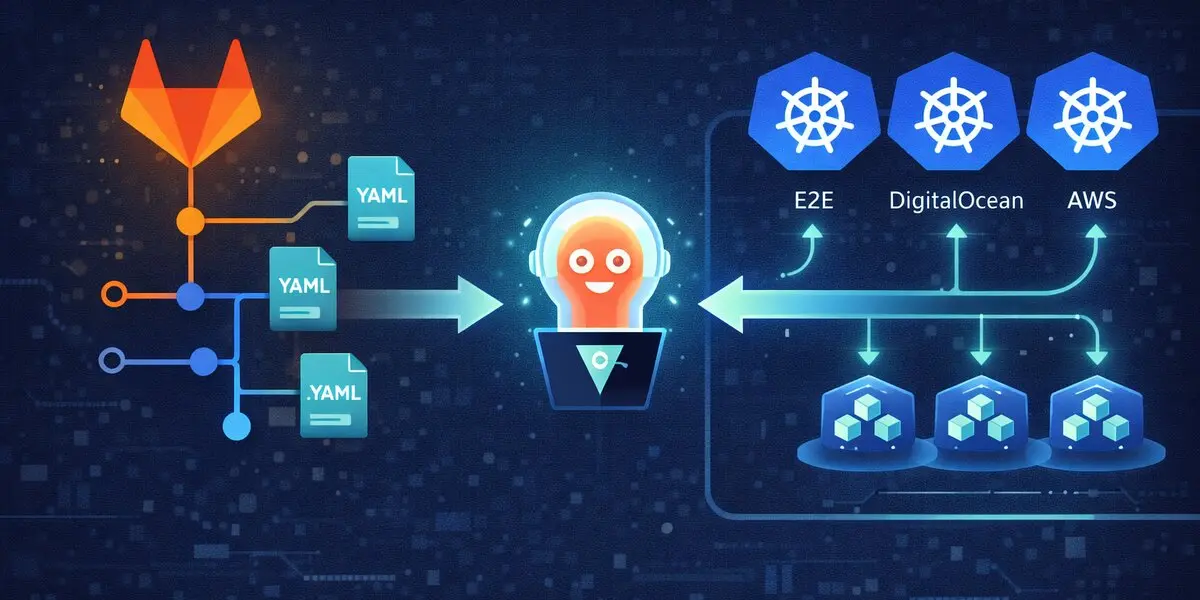
TL;DR
Installing ArgoCD is just the beginning. This guide walks you through the complete journey - from initial setup to managing multi-cluster deployments, automated resource limits, HPA configuration, and scaling to dozens of applications across multiple environments. What starts as a simple kubectl apply evolves into a production-grade GitOps control tower.
The Moment Before Everything Changes
There’s a point in every Kubernetes journey where deployments stop being “inconvenient” and start becoming dangerous.
Multiple microservices. Multiple environments. More than one cluster. A few manual kubectl apply commands here, a hotfix there, and suddenly no one can answer a simple question with confidence:
What exactly is running in production right now?
That’s usually when teams don’t go looking for a new tool. They go looking for control.
This article begins at that moment.
The Drift That Broke Production
Picture this: 3 AM, your phone buzzes. Production is down. Again.
Investigation reveals someone “quickly fixed” a production deployment at 2:30 AM using kubectl edit deployment. They increased memory limits to stop the OOMKill errors. It worked. The deployment restarted successfully.
But ArgoCD saw something different: Drift detected. Auto-healing initiated.
ArgoCD did exactly what it was configured to do—it synced the deployment back to match the Git repository. Back to the old memory limits. The pods OOMKilled. Again.
The “quick fix” lasted 30 seconds.
This is both ArgoCD’s greatest strength and its biggest mindset shift: Git is the source of truth. Not what’s running in the cluster. Not what someone “fixed” at 3 AM. What’s in Git.
If the fix isn’t in Git, it doesn’t exist. If the change isn’t committed and pushed, ArgoCD will revert it.
This isn’t a bug. This is exactly the behavior you want once you understand it. Because now you know:
- Every change is tracked (Git history)
- Every deployment is reproducible (Git tags)
- No mystery hotfixes that work in production but break when you redeploy
ArgoCD eliminates drift. But first, you need to commit to the discipline: If it’s not in Git, it shouldn’t be in the cluster.
Act I: The First Steps
Installing ArgoCD - The Foundation
ArgoCD becomes your GitOps control tower. But before it can manage dozens of applications across multiple clusters, you need to install it. And like all good journeys, it starts with a single command.
Creating the Foundation
First, we need a home for ArgoCD. A dedicated namespace keeps things organized and isolated:
| |
One line. One namespace. The foundation is laid.
The Installation Moment
Now comes the magic. ArgoCD provides a single manifest that bootstraps everything:
| |
What just happened? In seconds, you deployed:
- The ArgoCD API server
- The repository server
- The application controller
- Redis for caching
- The web UI
All running in your Kubernetes cluster, ready to transform how you deploy applications.
The Secret Handshake
ArgoCD generates an initial admin password during installation. It’s stored as a Kubernetes secret, base64-encoded (because that’s what Kubernetes does):
| |
Save this password. You’ll need it in a moment.
Pro tip: The original script has a typo (base64 –d with an en-dash instead of a hyphen). It’s the little things that teach you to always test your scripts.
Act II: The CLI - Your Command-Line Companion
Why the CLI Matters
The ArgoCD web UI is beautiful. It’s visual, intuitive, and perfect for exploring. But when you’re managing dozens of applications across multiple clusters, automation is king. That’s where the CLI shines.
Getting the ArgoCD CLI
The installation is straightforward:
| |
The -m 555 permission means: readable and executable by everyone, writable by no one. Security by design.
The First Login
Before you can use the CLI, you need to authenticate:
| |
Wait, localhost? By default, the ArgoCD server isn’t exposed externally. You’ll need to either:
- Port-forward:
kubectl port-forward svc/argocd-server -n argocd 8080:443 - Set up an Ingress (recommended for production)
- Use a LoadBalancer or NodePort service
When prompted:
- Username:
admin - Password: The one you retrieved from the secret earlier
Once authenticated, the CLI stores your session. No more password prompts for every command.
Act III: Building the Ecosystem
Adding Kubernetes Clusters
Here’s where ArgoCD’s power becomes apparent. You can manage applications across multiple Kubernetes clusters from a single ArgoCD instance.
| |
What happens behind the scenes?
- ArgoCD reads your
~/.kube/config - It creates a ServiceAccount in the target cluster
- It stores the credentials securely
- Now you can deploy to that cluster from ArgoCD
The multi-cluster moment: Imagine managing dev, staging, and production clusters from one control tower. That’s the power you just unlocked.
Connecting to Git Repositories
ArgoCD needs access to your Git repositories to pull manifests. For private repositories, you’ll need credentials:
| |
Security note: Instead of passwords, consider using:
- SSH keys for Git authentication
- Personal access tokens with limited scope
- GitHub Apps or GitLab Deploy Tokens
The command format stays similar, but your security posture improves dramatically.
Organizing with Projects
ArgoCD Projects are like folders for your applications. They provide:
- Logical grouping (by team, by environment, by product)
- RBAC boundaries (who can deploy what, where)
- Source and destination restrictions (prevent accidental production deployments)
| |
What this says:
- Create a project named
login-srv - Allow deployments to the specified destination cluster and namespace
- Allow sourcing manifests from the specified Git repository
Think of projects as security gates. They prevent mistakes like deploying dev code to production.
Act IV: The Application Dance
Creating Your First Application
Applications are where the rubber meets the road. This is where you tell ArgoCD: “Deploy this code, from this Git repo, to that cluster.”
| |
Let’s break down the flags:
--repo: Where your Kubernetes manifests live (Git repository)
--path: The directory within the repo containing manifests
--revision: The Git branch, tag, or commit to track
--dest-server: The Kubernetes cluster to deploy to
--dest-namespace: The namespace within that cluster
--sync-policy automated: Automatically sync when Git changes
--self-heal: If someone does a manual kubectl apply, ArgoCD reverts it to match Git
--project: The ArgoCD project for RBAC and organization
The Automated vs Manual Decision
Notice the --sync-policy automated flag? This is where philosophy meets practice.
Automated sync means:
- Git commit → ArgoCD automatically deploys
- Perfect for dev/staging environments
- GitOps at its purest: Git is the single source of truth
Manual sync means:
- Git commit → ArgoCD detects changes but waits
- You review the diff in the UI
- You click “Sync” when ready
- Perfect for production environments where you want that human checkpoint
Our approach? Automated for dev, manual for production. Best of both worlds.
Updating Applications
Applications evolve. Repositories change, namespaces shift, configurations update. Instead of deleting and recreating, you can update in place:
| |
ArgoCD reconfigures the application without losing history or state. Smooth.
Manual Sync - When You Need Control
Sometimes automated isn’t right. For production deployments, you want that manual approval step:
| |
One command. Deployment happens. Confidence intact.
Act V: The Scaling Challenge
The Sudden Realization
Everything’s working beautifully. You have ArgoCD managing your applications. Git commits trigger deployments. Life is good.
Then you realize: you have 50+ microservices across 3 environments. That’s 150+ deployments. And each one needs:
- Resource limits (CPU and memory)
- Resource requests (for proper scheduling)
- Horizontal Pod Autoscaling (HPA) rules
Doing this manually? That’s weeks of tedious YAML editing. There has to be a better way.
The CSV-Driven Solution
What if you could define all your resource configurations in a CSV file and let a script handle the rest?
| |
One CSV file. All your configurations in one place. Version controlled. Easy to review.
The Resource Limits Script
This script reads the CSV and automatically patches Kustomization files:
| |
What just happened?
- Read CSV file line by line
- For each application, generate a Kustomization patch
- Clone/navigate to the Git repository
- Commit the kustomization file
- Push to Git
- ArgoCD detects the change and syncs
One script. All applications updated. Time saved: countless hours.
The HPA Automation
Horizontal Pod Autoscaling is critical for handling traffic spikes. But configuring HPA for 50+ applications? Another CSV-driven script to the rescue:
| |
Now your applications automatically scale based on CPU utilization. Traffic spike? More pods spin up. Traffic drops? Pods scale down. Cost optimized. Performance maintained.
Act VI: The Multi-Project Orchestra
The GitOps Repository Structure - Foundation of Everything
Before we dive into automation scripts, let’s talk about the most critical decision you’ll make: how to structure your GitOps repository.
This isn’t just about organizing files. Your repository structure IS your deployment architecture. Get it right, and everything else falls into place. Get it wrong, and you’ll fight it forever.
The Branching Strategy
ArgoCD tracks Git branches to determine what gets deployed where. The pattern is elegant:
One Repository, Multiple Branches, Different Environments
| |
The workflow:
- Developer commits manifest changes to
devbranch - ArgoCD auto-syncs to dev cluster
- After testing, merge
dev→staging - ArgoCD auto-syncs to staging cluster
- After validation, merge
staging→prod - ArgoCD syncs to production (auto or manual, your choice)
Why this works:
- Git is the approval mechanism: Merging between branches = promotion between environments
- Easy rollback:
git reverton the branch = instant rollback - Clear audit trail: Git history shows exactly when and who promoted to production
- Branch protection: Protect
prodbranch, require reviews for merges
The Directory Structure Convention
Inside each branch, organize manifests by organizational structure:
| |
Real-world example from the scripts:
| |
Notice the patterns:
- Top-level: Organization name (
acme-org) - Second-level: Project category (
client-projects,compliance-tools,analytics-platform) - Third-level: Specific client or product name
- Fourth-level: Service type (
services,ui,io) - Bottom-level: Individual microservice with its manifests
The Path Convention in ArgoCD Applications
When creating ArgoCD applications, the --path flag points to these directories:
| |
Why this depth?
- Clarity: No ambiguity about what each path contains
- Scalability: Add new clients/projects without restructuring
- Multi-tenancy: Different teams can work independently
- RBAC friendly: Restrict ArgoCD project access by path patterns
Environment-Specific Variations
The same path exists in each branch, but contents differ:
In dev branch:
| |
In prod branch (same path):
| |
Same path, different config per environment = GitOps magic
The Common Manifests Pattern Explained
Every environment has a -common-manifests directory:
| |
Why separate common manifests?
- Deploy order control: Deploy common manifests BEFORE applications
- Shared configuration: One ConfigMap used by multiple services
- Environment isolation: Dev secrets ≠ Prod secrets
- Single source of truth: Update one ConfigMap, all services get it
How to use:
| |
Order matters! Common manifests first, applications second.
Multi-Organization Support
For companies managing multiple organizations or clients:
| |
ArgoCD Projects map to organizations:
| |
RBAC benefits:
- Alpha team can only deploy to
org-alpha-*namespaces - Beta team can only deploy to
org-beta-*namespaces - Platform team can deploy to all
The Revision Strategy: Branches vs Tags
You have choices for the --revision flag:
Branch-based (recommended for most cases):
| |
Tag-based (recommended for production with strict change control):
| |
Commit SHA-based (for debugging/rollback):
| |
Our recommendation:
- Dev/Staging: Use branches for automatic updates
- Production: Use branches with manual sync policy, OR use tags for maximum control
Repository Structure Best Practices
DO:
- ✅ Use consistent naming across all paths
- ✅ Keep manifests close to application structure
- ✅ Use Kustomize for environment-specific overrides
- ✅ Version control everything (even secrets via sealed-secrets)
- ✅ Document your structure in the repository README
DON’T:
- ❌ Mix application code and manifests in the same repo (separate concerns)
- ❌ Store secrets unencrypted (use sealed-secrets, SOPS, or Vault)
- ❌ Use deeply nested paths (3-5 levels max)
- ❌ Create one-off directory structures (consistency > special cases)
- ❌ Skip the common-manifests pattern (you’ll regret it at scale)
Validating Your Structure
Before deploying, validate your manifest structure:
| |
The Template That Changes Everything
When you’re managing multiple projects across multiple environments (dev, staging, production), you need a systematic approach. Enter the template-based deployment script:
| |
The power of this approach:
- Define once: Create a CSV with all your applications
- Deploy anywhere: Switch Kubernetes context, run the script
- Consistency: Every application follows the same pattern
- Auditability: The CSV file is version controlled
- Scalability: Adding a new application is just a new CSV line
Real-World Example: Multi-Environment Deployment
Let’s look at a real pattern from the project - deploying an application across dev, staging, and production:
Dev Environment:
| |
Staging Environment:
| |
Production Environment:
| |
The pattern emerges:
- Same repository, different branches (dev/staging/prod)
- Separate projects per environment
- Different sync policies (manual for dev testing, automated for staging/prod)
- Clear naming convention:
<cluster>-<project>-<env>.{app}.{env}
Act VII: The Scripts Toolkit
Throughout this journey, we’ve created a powerful toolkit. Let’s catalog what we have:
Installation Scripts
01_argocd_installation.sh: Bootstrap ArgoCD in the cluster 02_argocd_cli_installation.sh: Install the CLI tool 03_argocd_cli_login.sh: Authenticate with ArgoCD
Configuration Scripts
04_argocd_cli_cluster_addition.sh: Register new Kubernetes clusters 05_argocd_cli_repo_addition.sh: Connect Git repositories 06_argocd_cli_proj_addition.sh: Create ArgoCD projects
Application Management Scripts
07_argocd_cli_app_addition.sh: Create new applications 08_argocd_cli_app_updation.sh: Update application configurations 09_argocd_cli_app_sync.sh: Manually trigger synchronization
Automation Scripts
10_resource_limits_patch_kustomization.sh: Bulk apply resource limits via CSV 11_hpa.sh: Bulk configure HPA rules via CSV
Project-Specific Scripts
project_commands/e2e/: End-to-end deployment scripts for E2E environments project_commands/do/: DigitalOcean cluster deployment scripts project_commands/e2e/template-argo-create.sh: Template for new project deployments
Each script is a tool. Together, they form a comprehensive GitOps automation framework.
The Key Learnings
1. Start Simple, Scale Smart
Don’t try to automate everything on day one. Start with:
- Install ArgoCD
- Deploy one application manually
- Understand the workflow
- Then automate
2. Git is the Single Source of Truth
Once you adopt ArgoCD, resist the urge to do manual kubectl apply commands. If it’s not in Git, it shouldn’t be in the cluster. This discipline is what makes GitOps powerful.
3. Projects Prevent Disasters
Use ArgoCD Projects to create guardrails:
- Developers can only deploy to dev namespaces
- Production deployments require specific approvals
- Cross-environment accidents become impossible
4. Sync Policies Matter
Automated sync works when:
- You trust your CI/CD pipeline
- Rollbacks are easy
- The environment is non-critical
Manual sync is better when:
- Human review is required
- Changes have high impact
- Compliance requires approval workflows
5. Automation Scales, Manual Doesn’t
Managing 5 applications manually? Doable. Managing 50? Painful. Managing 500? Impossible.
CSV-driven automation isn’t overkill - it’s survival.
Troubleshooting Tales
Problem: “Application is OutOfSync”
Symptom: ArgoCD dashboard shows red, application is out of sync
Common causes:
- Someone did a manual
kubectl apply(drift detected) - Git repository was updated but auto-sync is disabled
- Kustomize build failed due to invalid YAML
Solution:
| |
Problem: “Authentication Failed”
Symptom: CLI commands fail with authentication errors
Solution:
| |
Problem: “Cluster Not Found”
Symptom: Application creation fails, can’t find destination cluster
Solution:
| |
Problem: “Sync Failed with Kustomize Error”
Symptom: Application won’t sync, Kustomize build errors
Solution:
| |
Production Considerations
High Availability
For production ArgoCD deployments:
| |
Run multiple replicas of the API server and use Redis HA for session management.
Backup and Disaster Recovery
ArgoCD configuration is stored in Kubernetes. Back up:
| |
Monitoring and Alerting
Key metrics to track:
- Application sync status (how many are out of sync?)
- Sync failures (what’s breaking?)
- API server health (is ArgoCD itself healthy?)
- Repository connection status (can ArgoCD reach Git?)
Integrate with Prometheus and Grafana for visibility.
Access Control
Use ArgoCD’s RBAC to limit permissions:
| |
Developers can sync applications, but only ops can delete them.
Act VIII: The Migration Chronicles - Moving Clusters Like a Pro
The Migration Wake-Up Call
Remember that scenario from the beginning? The one where you’re asked to migrate Kubernetes clusters, possibly multiple times, and the panic sets in?
That’s not a hypothetical. That’s real life.
When cloud costs spike, when performance isn’t meeting expectations, or when compliance requires moving to a different provider - cluster migrations become inevitable. Without ArgoCD, this is a nightmare. With ArgoCD? It’s actually manageable.
Let’s walk through the real-world patterns that make cluster migration smooth.
The Multi-Cloud Reality: E2E, DigitalOcean, and AWS EKS
In real production environments, you rarely stick to one cloud provider. Cost optimization, client requirements, compliance, and redundancy often mean you’re managing a multi-cloud Kubernetes estate.
Our real deployment spans three infrastructure types:
E2E/Testing Cluster: On-premises or dedicated testing infrastructure
| |
DigitalOcean Kubernetes Clusters: For cost-effective development and staging
| |
AWS EKS Clusters: For enterprise-grade production workloads
| |
The multi-cloud pattern: Test in E2E → Validate in DO → Deploy to AWS EKS for production scale.
Why Multi-Cloud? The Business Reality
You might wonder: “Why not just pick one cloud provider and stick with it?”
Here’s the reality we faced:
Cost Optimization: DigitalOcean offered better pricing for dev/staging workloads. AWS EKS provided enterprise features for production.
Client Requirements: Some clients require AWS for compliance reasons. Others are cost-sensitive and prefer DigitalOcean.
Risk Mitigation: If one cloud provider has an outage, critical services can fail over to another.
Feature Availability: AWS EKS offers advanced features (IAM integration, managed node groups, Fargate) that aren’t available everywhere.
Geographic Distribution: Different cloud providers have different regional availability.
ArgoCD makes managing this complexity not just possible, but actually manageable.
The Three-Prefix Naming Convention
Notice how the naming convention evolved for multi-cloud:
Format: <cloud-prefix>-<project>-<environment>-apps.<service>.<environment>
E2E Cluster Applications:
| |
DigitalOcean Cluster Applications:
| |
AWS EKS Cluster Applications:
| |
Why this matters even more in multi-cloud:
- Instant cloud identification:
argocd app list | grep "aws-"shows all AWS deployments - No cross-cloud collisions: Same app name can exist in DO and AWS simultaneously
- Clear billing attribution: Know which cloud is running what
- Disaster recovery: Quickly identify which apps need to failover to which cloud
AWS EKS-Specific Considerations
AWS EKS has unique characteristics that affect your ArgoCD deployments:
EKS Cluster Endpoint Format
EKS cluster endpoints follow a specific pattern:
| |
Examples from our deployment:
https://B436343EB36A2980766273BAA9BD9F82.gr7.ap-south-1.eks.amazonaws.com- Region:
ap-south-1(Mumbai) - The long alphanumeric ID is unique to each EKS cluster
Adding EKS Clusters to ArgoCD
The process is similar to other clusters, but with AWS-specific authentication:
| |
Important: The cluster name in your kubeconfig will be an ARN format:
| |
But ArgoCD stores it by the API server endpoint.
IAM and RBAC Considerations
EKS uses AWS IAM for cluster authentication. When ArgoCD connects:
- ArgoCD creates a ServiceAccount in the EKS cluster
- That ServiceAccount needs proper Kubernetes RBAC permissions
- The IAM role/user running ArgoCD needs
eks:DescribeClusterpermission - For cross-account EKS clusters, you need to set up IAM role assumption
Best practice: Create a dedicated IAM role for ArgoCD with minimal permissions:
| |
EKS Storage Classes
EKS comes with AWS EBS-backed storage classes:
| |
When migrating from DO to EKS, your PersistentVolumeClaims may need updating:
| |
Pro tip: Use Kustomize overlays to handle cloud-specific storage classes automatically.
Real-World Multi-Cloud Deployment Example
Here’s how we deploy the same application across all three environments:
E2E (Testing):
| |
DigitalOcean (Staging):
| |
AWS EKS (Production):
| |
Notice:
- Same Git repository across all clouds
- Same path to manifests
- Different Git branches (dev/staging/prod) for environment-specific configs
- Different cluster endpoints and project prefixes
- Consistent naming pattern makes everything predictable
The Multi-Cloud Migration Pattern
When you need to move from one cloud to another (say, from DO to AWS EKS), the pattern is:
Step 1: Deploy in Parallel
| |
Step 2: Validate AWS EKS Deployment
- Test all functionality
- Verify database connections (might need security group updates)
- Check AWS-specific integrations (IAM roles, S3 access, RDS connections)
- Load test to ensure EKS node groups can handle traffic
Step 3: DNS Cutover
| |
Step 4: Monitor
- CloudWatch for EKS metrics
- Application logs in CloudWatch Logs or your logging solution
- Cost monitoring (EKS + node groups + EBS volumes)
Step 5: Document and Comment
| |
Cloud-Specific Gotchas
AWS EKS Gotcha 1: IAM Authentication Token Expiry
Problem: EKS uses AWS IAM for authentication. Tokens expire, causing ArgoCD to lose cluster access.
Symptom: ArgoCD shows cluster as “Unknown” or sync fails with authentication errors.
Solution: Ensure ArgoCD has valid AWS credentials that refresh automatically. Use IRSA (IAM Roles for Service Accounts) if ArgoCD runs in EKS:
| |
AWS EKS Gotcha 2: VPC and Security Groups
Problem: EKS clusters are VPC-isolated. Applications can’t reach databases or services in other VPCs.
Solution:
- VPC Peering between EKS VPC and database VPC
- AWS PrivateLink for managed services
- Security group rules allowing EKS node group to reach RDS, ElastiCache, etc.
Validate connectivity before migration:
| |
AWS EKS Gotcha 3: LoadBalancer Annotations
Problem: DigitalOcean and EKS use different LoadBalancer implementations.
DigitalOcean LoadBalancer:
| |
AWS EKS LoadBalancer (ALB):
| |
Solution: Use Kustomize overlays to apply cloud-specific annotations:
| |
AWS EKS Gotcha 4: Node Group Scaling
Problem: EKS node groups have different scaling characteristics than DO node pools.
Solution: Configure Cluster Autoscaler for EKS:
| |
Multi-Cloud Cost Optimization Tips
Tip 1: Right-Cloud for Right-Workload
- Dev/Test: Use DigitalOcean (cheaper, simpler)
- Production with AWS services: Use EKS (tight integration with RDS, S3, etc.)
- Batch jobs: Use Fargate on EKS (pay only when running)
Tip 2: Cross-Cloud Resource Sharing
- Keep ArgoCD in one cluster, manage all others
- Centralized logging/monitoring (avoid per-cloud solutions)
- Shared Git repository (one source of truth)
Tip 3: Reserved Capacity
- DigitalOcean doesn’t have reserved pricing - pay-as-you-go
- AWS EKS: Use Savings Plans for nodes, Reserved Instances for steady-state workloads
- Compare costs quarterly and rebalance
Tip 4: Data Transfer Costs
- Keep databases in same cloud as applications (cross-cloud data transfer is expensive)
- Use CloudFront/CDN for serving static assets
- Minimize cross-region traffic
The Multi-Cloud Directory Structure
Update your project structure to reflect multi-cloud reality:
| |
The pattern:
- Separate directories per cloud provider
- Same application structure across all clouds
- Cloud-specific configurations in dedicated folders
- Easy to compare:
diff project_commands/do/myapp.sh project_commands/aws/myapp.sh
When to Use Which Cloud?
After managing multi-cloud for months, here’s our decision matrix:
| Workload Type | Recommended Cloud | Reason |
|---|---|---|
| Development environments | DigitalOcean | Cost-effective, simple |
| Staging with low traffic | DigitalOcean | Good balance of features/cost |
| Production (AWS-heavy stack) | AWS EKS | Native integration with RDS, S3, IAM |
| Production (cloud-agnostic) | DigitalOcean | Simpler, cheaper |
| Compliance-required workloads | AWS EKS | Better compliance certifications |
| Microservices with high scaling | AWS EKS | Better autoscaling, Fargate option |
| Simple stateless apps | DigitalOcean | Don’t overpay for features you won’t use |
The beauty of ArgoCD? The decision can change, and your deployment process stays the same.
Migration Strategy: The Parallel Deployment Approach
Here’s the secret to zero-downtime migrations: Don’t migrate. Replicate, verify, then switch.
Step 1: Deploy to New Cluster in Parallel
Keep the old cluster running. Deploy the same applications to the new cluster using ArgoCD:
| |
Notice:
- Same repository
- Same path
- Same revision
- Different destination cluster
- Different project name (prefixed with cluster identifier:
e2e-vsdo-)
Step 2: Verify Everything Works
Run your test suite against the new cluster. Check:
- Application health in ArgoCD dashboard
- Database connections
- External API integrations
- Monitoring and logging
- SSL certificates
- Ingress rules
Step 3: DNS Cutover
Update your DNS to point to the new cluster. Traffic shifts. Old cluster sits idle but ready.
Step 4: Monitor and Validate
Watch metrics, logs, error rates. Everything looking good?
Step 5: Document the Migration
Here’s a trick that saved us countless hours: Comment, don’t delete.
In the old cluster’s deployment script:
| |
Why comment instead of delete?
- Historical record: You know what was deployed and where
- Quick rollback: Uncomment and redeploy if needed
- Documentation: New team members see the migration history
- Audit trail: Compliance teams love this
The Naming Convention That Saves Lives
Notice the naming pattern in the scripts?
Format: <cluster-prefix>-<project>-<environment>-apps.<service>.<environment>
Examples:
e2e-analytics-dev-apps.analyticsui.dev- E2E cluster, analytics project, dev environmentdo-analytics-staging-apps.analyticsui.staging- DigitalOcean cluster, analytics project, stagingdo-analytics-prod-apps.analyticsui.prod- DigitalOcean cluster, analytics project, production
Why this matters:
- No naming collisions: You can have the same app in multiple clusters
- Clear ownership: You know which cluster at a glance
- Easy filtering:
argocd app list | grep "do-"shows only DO clusters - Scripting friendly: Parse application names programmatically
Tips and Tricks from the Trenches
Trick 1: The Service-Specific Comment Pattern
Some services run on dedicated infrastructure. Document it:
| |
Why?
- Prevents accidental “fixes” from well-meaning teammates
- Documents architectural decisions
- Explains why something is commented out
Trick 2: Environment-Specific Sync Policies
Notice the pattern across environments:
Dev: Manual sync
| |
Staging: Automated sync
| |
Production: Automated sync (after testing in staging proves it’s safe)
| |
The philosophy:
- Dev: Developers test manually, sync when ready
- Staging: Auto-sync to catch integration issues early
- Prod: Auto-sync because staging already validated it
Trick 3: The Migration Readiness Checklist
Before migrating any cluster, verify:
Infrastructure:
- New cluster provisioned and accessible
- Node sizes match or exceed old cluster
- Storage classes configured
- Network policies compatible
- LoadBalancer/Ingress controller deployed
ArgoCD:
- New cluster added to ArgoCD:
argocd cluster add <context> - Git repositories connected
- Projects created with correct permissions
- RBAC configured
Applications:
- ConfigMaps verified (check for cluster-specific values)
- Secrets transferred (database credentials, API keys, certificates)
- Persistent volumes migrated (if applicable)
- Ingress DNS updated
- SSL certificates provisioned
Validation:
- Health checks passing
- Logs flowing to monitoring system
- Metrics being collected
- Alerts configured
- Smoke tests passed
Trick 4: The Progressive Migration Strategy
Don’t migrate everything at once. Migrate in waves:
Wave 1: Non-critical, stateless services
- Read-only APIs
- Documentation sites
- Internal tools
Wave 2: Stateless services with dependencies
- Microservices that call other services
- Worker queues
- Caching layers
Wave 3: Stateful services
- Databases (with proper backup/restore)
- File storage services
- Session stores
Wave 4: Critical production workloads
- Customer-facing APIs
- Payment processing
- Authentication services
Each wave proves the migration strategy before risking more critical services.
Trick 5: The Common Manifests Pattern
Look closely at the deployment scripts - there’s always a “common manifests” application:
| |
What goes in common manifests?
- ConfigMaps used by multiple services
- Shared secrets
- Network policies
- Resource quotas
- Service meshes configurations
- Monitoring agent configs
Pro tip: Deploy common manifests FIRST, then deploy applications. Otherwise, applications fail with “ConfigMap not found” errors.
Trick 6: The Multi-Cluster Deployment Script Template
The CSV-driven template approach is migration gold:
| |
CSV file (template-argo-create.csv):
| |
Migration magic: To migrate to a new cluster, just update the CLUSTER column in the CSV and rerun the script!
Even better: Maintain separate CSV files:
e2e-cluster-apps.csv- E2E cluster applicationsdo-dev-cluster-apps.csv- DO dev cluster applicationsdo-staging-cluster-apps.csv- DO staging cluster applicationsdo-prod-cluster-apps.csv- DO production cluster applications
Now migrations are literally:
| |
One command. Entire environment deployed to new cluster.
The Directory Structure That Scales
Notice the project structure:
| |
The pattern:
- Generic scripts in
scripts/ - Cluster-specific deployments in
project_commands/<cluster-type>/ - Each project gets its own script with all environments (dev, staging, prod)
Migration workflow:
- Test deployment in E2E:
./project_commands/e2e/analytics.sh - Migrate to DO staging:
./project_commands/do/analytics.sh(commented sections show what migrated) - Promote to DO prod: Already in the same script, just different cluster endpoint
Real-World Migration Gotchas
Gotcha 1: The LoadBalancer IP Change
Problem: Old cluster has LoadBalancer with IP 1.2.3.4. New cluster assigns 5.6.7.8.
Solution: Update DNS before testing, or use ExternalDNS to automate this.
Gotcha 2: The Persistent Volume Data
Problem: StatefulSets have data in PersistentVolumes. Can’t just redeploy.
Solution:
- Backup data using Velero or custom backup scripts
- Deploy application in new cluster
- Restore data to new PVs
- Validate data integrity
- Switch traffic
Gotcha 3: The Secret Drift
Problem: Secrets in old cluster were manually updated. New cluster uses stale secrets from Git.
Solution: This is why GitOps is non-negotiable. If it’s not in Git, it doesn’t exist. Before migration, audit all secrets and commit them to Git (using sealed-secrets, SOPS, or Vault).
Gotcha 4: The Namespace Collision
Problem: Multiple applications using the same namespace name in different clusters causes ArgoCD confusion.
Solution: Namespace naming convention: <project>-<environment>-apps
analytics-dev-appsanalytics-staging-appsanalytics-prod-apps
Clear, consistent, collision-free.
Gotcha 5: The “It Works on My Machine” Cluster
Problem: Application works in E2E but fails in production cluster.
Solution: Cluster parity checks:
| |
Differences here = migration surprises later.
The Post-Migration Cleanup
After successful migration, don’t just leave the old cluster running forever:
Week 1: Monitor new cluster closely, keep old cluster as hot standby Week 2: If stable, stop old cluster but keep resources (for quick rollback) Week 3: If still stable, document the migration and archive old cluster configs Month 2: Decommission old cluster, celebrate migration success
Document everything:
| |
This document becomes invaluable for:
- Future migrations (you’ll remember what worked)
- Incident response (rollback procedure is documented)
- Knowledge transfer (new team members learn from it)
- Compliance (audit trail exists)
What’s Next?
You’ve installed ArgoCD. You’ve configured applications. You’ve automated resource management. You’ve even learned how to migrate clusters like a pro. But the journey doesn’t end here.
Progressive Delivery
Explore ArgoCD Rollouts for:
- Blue/green deployments
- Canary releases with automated analysis
- Traffic splitting with Istio/Linkerd
ApplicationSets
Manage hundreds of applications with generators:
- Git generator (create apps from repository structure)
- Cluster generator (deploy to all clusters automatically)
- Matrix generator (combine multiple generators)
Notifications
Get alerted when deployments fail:
- Slack notifications
- Email alerts
- Webhook integrations
GitOps Beyond Kubernetes
Use ArgoCD with:
- Terraform (GitOps for infrastructure)
- Crossplane (Kubernetes-native infrastructure)
- Helm charts with values overrides
Final Thoughts
ArgoCD isn’t just a deployment tool. It’s a philosophy shift.
Before ArgoCD:
- Deployments were tribal knowledge
- “What’s running in production?” was a hard question
- Rollbacks meant panic and manual intervention
- Drift between environments was inevitable
After ArgoCD:
- Git is the single source of truth
- The UI shows exactly what’s deployed, everywhere
- Rollbacks are a git revert and a sync
- Drift is immediately visible and auto-corrected
Is it more complex than kubectl apply -f? Initially, yes.
Is it worth it? Ask yourself three years from now when you’re managing 100+ microservices across 5 clusters and deployments “just work.”
That’s when you’ll know the journey was worth it.
Resources and References
Official Documentation
Tools Used in This Guide
- Kubernetes 1.24+
- ArgoCD stable release
- GitLab (or GitHub/Bitbucket)
- Kustomize for manifest patching
Community Resources
Related Articles
- The 5S5 Pattern: GitLab CI/CD Variable Escaping - Automate pushing manifests to your GitOps repository via GitLab API, with secure token handling and the clever
5S5placeholder pattern to prevent premature variable expansion.
Kudos to the Mavericks at the DevOps Den. Proud of you all.
Built with determination, automated with scripts, deployed with confidence - powered by GitOps and ArgoCD.
More from me on www.uk4.in.